FireStorm Firing System User Guide
Introduction
Thank you for purchasing a FireStorm Firing System.
This firing system is designed for the safe and reliable wireless control of fireworks and pyrotechnics.
Power & Batteries
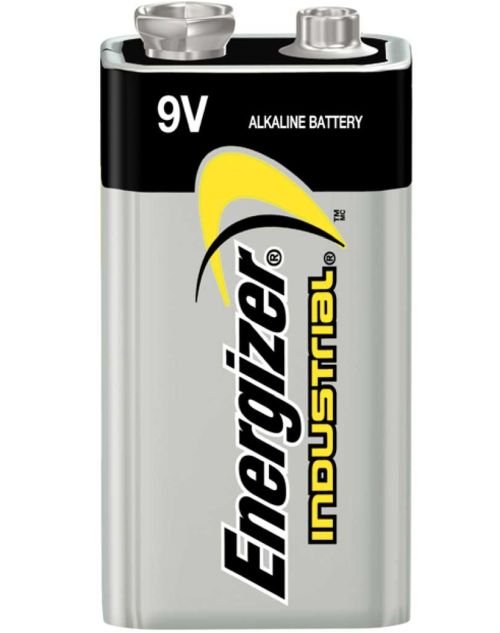
We recommend Energizer Industrial alkaline batteries.
You can also use disposable Lithium batteries.
Lithium batteries have some advantages over Alkaline batteries.
- High current capability.
- Low temperature performance.
- Higher overall capacity.
- No leaking.
- Low self discharge.
However there are some disadvantages.
- Significantly higher cost.
- Unreliable battery level indication - the battery level readout on the firing modules is set for Alkaline batteries.
| Device | Batteries Required | External Power Connector? | Firing Voltage |
|---|---|---|---|
| TX1 Handheld Remote | 2 x AA | No | N/A |
| TX2 Control Desk Remote | 4 x AA | Optional | N/A |
| RX1 | 1 x PP3 9V | No | 9V |
| RX6 | 2 x PP3 9V | Optional | 18V |
| RX18 | 2 x PP3 9V | Yes | 18V internal, 12/24V external |
| RX36 | 2 x PP3 9V | Yes | 18V internal, 12/24V external |
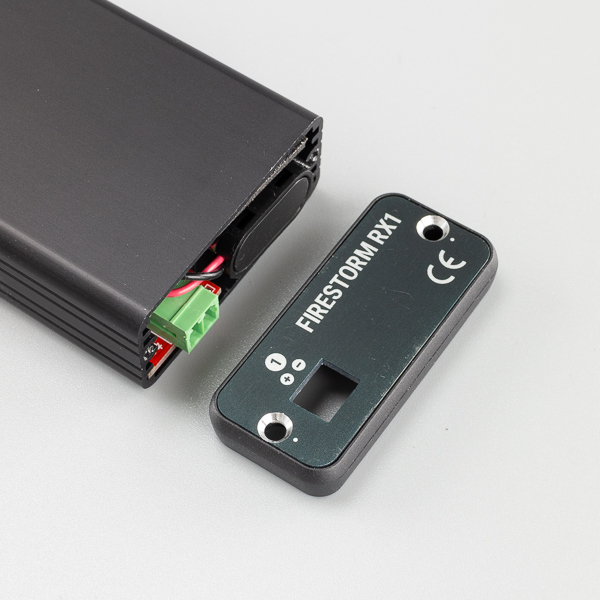
RX1 Battery Install
- Remote 2 x screws marked with a silver dot using Philips PH1 screwdriver.
- Remove end panel.
- Slide battery in first and attach battery clip securely.
- Reassemble.
RX6 Battery Install

Initial Setup
The system is designed so that a firing module is bonded to a remote control. The remote control has a Channel Number and Starting Cue Number that the user can set.
For example the RX6 (6 Cue Module) bonded to a Remote set to Channel 1, Cue 1 will then fire when the remote is set to Channel 1, and on Cues 1 - 6.
| Module Type | Starting Cue | Module will fire on Remote Control Cues |
|---|---|---|
| RX6 | 1 | 1 - 6 |
| RX6 | 7 | 7 - 12 |
| RX36 | 1 | 1 - 36 |
| RX36 | 37 | 37 - 72 |
Bonding
The system requires you to initially “bond” or “pair” a firing modules to the remote control. If a firing module has never been bonded, then it can not be controlled. This prevents unauthorised firing except from the desired remote control.
You can bond a firing module to a remote control as many times as necessary. Each time is it bonded the previous bonding information is removed. The TX1 handheld remote control and the TX2 control desk both allow bonding of firing modules in very similar ways.
During the bonding procedure the Channel Number and Cue Number that the firing module will respond to is set.
First we must explain the difference between “Channel” and “Cue”.
Channel Number
This is the channel that the remote control is operating on. Consider different channels to be like having completely separate remote controls. Each channel will allow an entire set of firing modules to be controlled without firing any modules that are bonded to a different channel.
Channels are useful for dividing your show when using multiple firing modules. For example, you may have three firing modules at the front of your show set to Channel 1, and two more firing modules at the back of your show set to Channel 2 for controlling firework shells.
Cue Number
A cue is the identifying number of a terminal on the firing module that you connect the igniter to. For example the RX6 firing module has 6 cues and the RX36 has 36 cues.
Bonding Introduction
When you bond a firing module to a remote control, the firing module will respond to the Channel and Cue that you set when bonding.
For example, if the remote control is set to Channel 1 and Cue 1 and you bond it to an RX36 firing module, the firing module will fire when Channel 1 is set and Cue 1 to 36 is fired on the remote control.
If you then set the remote control to Channel 2 and Cue 01, and bond the firing module again, it will now fire when Channel 2 is set and Cue 1 through 36 is fired on the remote control.
Finally if the remote control is set to say Channel 1 and Cue 10, and you bond the firing module, it will now fire when Channel 1 is set and Cue 10 through 45.
You can bond the firing modules as many times as you like to reconfigure your firing system for different shows and setups. This easy bonding procedure is one of the powerful features of the FireStorm Firing System.
⚠️ Note: When bonding your modules to a remote control, only bond 1 module at a time. Do not attempt to bond multiple modules at the same time. Bond the modules 1 by 1.
Bonding Procedure
Module Bonding
- Connect antenna to module.
- Arm the module by turning the slide switch of key switch to ARM. Allow a few seconds for the module to start up.
- Press and HOLD the bond button for about 5s until the Bond LED is solid Orange. The unit is now waiting to be bonded to a remote.
⚠️Note: Do not hold the bond button for longer than 15s until the Bond light goes out. This will reset the module.
TX1 Bonding
- Connect antenna.
- Switch remote on by holding POWER button for about 1s.
- Ensure remote is disarmed (top right LED should be OFF). Display should be showing the currently selected Cue between [01] and [99].
⚠️Note: Remote must be disarmed for bonding.
- Tap POWER button to enter channel set mode. Display will show [c1], [c2] …. [c9].
- Select desired channel with arrow buttons. In general, you will leave this set to [c1].
- Tap POWER button again to exit channel set mode. Display will return to currently selected Cue.
- Set desired starting cue for the module. In general you will leave this set to [01].
- Press and release the FIRE button.
- Module BOND LED will extinguish and return to flashing the battery level every 5 seconds.
- The middle light on the remote will now be either RED or GREEN to show the continuity status of the currently selected cue. If an igniter is connected, it will be GREEN. If there is no igniter, it will be RED.
⚠️Note: The remote link light updated 1x per second, to show the continuity status of the selected cue.
| Link Light | Status |
|---|---|
| ⚪ Off | No signal |
| 🟢 Green | Good Continuity, igniter connected |
| 🔴 Red | Bad continuity, no igniter connected |
TX2 Bonding
TX1 Handheld Remote Control
TX2 Control Desk Remote Control
Bond Module
##RX1 Firing Module
##RX6 Firing Module
##RX36 Firing Module